Resolution4K UHD (3840 x 2160)
Panel TypeIPS Black
At a Glance: The U2723QE – Key Features and First Impressions
The Dell Ultrasharp U2723QE arrives not merely as another high-resolution display, but as a meticulously engineered workstation hub. Targeting professionals who demand clarity, connectivity, and a sophisticated color experience, this 27-inch monitor centers its appeal around an innovative IPS Black panel and an integrated suite of connectivity options. In a market saturated with 4K panels, the U2723QE distinguishes itself by focusing on deep blacks and a comprehensive USB-C hub, aiming to declutter desks and streamline workflows. Our evaluation dives into whether this Dell offering lives up to its premium aspirations for 2026.

Diving Deep into the Display: IPS Black, Contrast, and Color Accuracy
The visual centerpiece of the U2723QE is its 27-inch IPS Black panel. This technology represents a significant step beyond traditional IPS panels, which often struggle with achieving deep blacks, leading to a grayish appearance in darker scenes. IPS Black aims to rectify this by drastically improving the native contrast ratio.
IPS Black Technology: Revolutionizing Contrast Ratios
Dell’s implementation of IPS Black technology yields a native contrast ratio of 2000:1, a figure nearly double that of most standard IPS displays. This enhancement is crucial for content creators, photographers, and anyone working with detailed imagery or video. The improved contrast allows for finer gradations between light and dark tones, revealing more detail in shadows and highlights without compromising the overall image integrity. In practice, this translates to blacks that appear genuinely black, rather than a muted gray, significantly boosting the perceived depth and realism of the image. This is particularly noticeable in HDR content, though the U2723QE is not primarily marketed as an HDR display. The benefit is a more immersive and accurate viewing experience across all types of content.

Color Gamut and Accuracy: Professional-Grade Visuals
For professionals, color accuracy is paramount. The U2723QE covers 100% of the sRGB color gamut and 98% of the DCI-P3 color gamut. This extensive coverage, combined with factory calibration, ensures that colors are rendered with high fidelity. The reported Delta E < 2 out of the box means that color differences are virtually imperceptible to the human eye, making it suitable for color-critical tasks like photo editing, graphic design, and video post-production. The uniformity across the screen is also commendable, avoiding the common pitfalls of noticeable brightness or color shifts from the center to the edges.
Brightness, Sharpness, and Pixel Response Time
With a standard brightness of 400 nits, the U2723QE is sufficiently bright for most well-lit office environments and indoor settings. While it doesn’t reach the extreme peak brightness levels seen in some HDR-focused monitors, it provides a comfortable and consistently visible image. The 4K resolution (3840 x 2160) on a 27-inch panel results in a very high pixel density of approximately 163 pixels per inch (PPI), delivering exceptionally sharp text and crisp details. Pixel response time, often a weak point for IPS panels, is rated at 8ms in Normal mode and 5ms in Fast mode. While not ideal for competitive, high-refresh-rate gaming, this is more than adequate for professional applications, minimizing motion blur in typical office or creative tasks.
The Power of the Hub: USB-C Connectivity and Beyond
Where the U2723QE truly shines is its integrated connectivity hub, designed to simplify the modern workspace. The extensive array of ports aims to eliminate the need for separate docking stations or dongles.
Seamless USB-C Integration: Power Delivery and Data Transfer
The monitor features a single USB-C upstream port that supports DisplayPort Alternate Mode, high-speed data transfer, and crucially, up to 90W of Power Delivery. This single cable solution can power most ultrabooks and many performance laptops, charging them directly from the monitor. This drastically reduces cable clutter and streamlines the process of connecting and disconnecting a laptop. The data transfer speeds through the USB-C connection are also impressive, leveraging USB 3.2 Gen 2 speeds for rapid file transfers to connected external drives or peripherals.

Expanded Connectivity: Ports and Peripherals
Beyond the primary USB-C connection, the U2723QE offers a comprehensive selection of ports on its rear and side panels. This includes multiple USB-A ports (including downstream ports for accessories like keyboards and mice), HDMI 2.0, DisplayPort 1.4, and even an RJ45 Ethernet port for stable wired network connectivity. There’s also an audio line-out port. This rich port selection ensures compatibility with a wide range of devices, from older laptops to desktops and peripherals, making it a versatile command center for any workstation.
Daisy-Chaining Capabilities: Boosting Productivity
For users requiring multiple displays, the U2723QE includes both DisplayPort In and DisplayPort Out. This allows for easy daisy-chaining of multiple monitors. By connecting a primary laptop to the U2723QE via USB-C, and then connecting a second monitor to the U2723QE’s DisplayPort Out, users can create a multi-monitor setup with a single cable connection to their laptop. This feature is a significant productivity booster, enabling a clean, expanded desktop real estate without a tangle of cables.
👍 Pros
- Exceptional contrast ratio with IPS Black technology.
- Excellent color accuracy for professional work (100% sRGB, 98% DCI-P3).
- Robust USB-C hub with 90W Power Delivery and high-speed data.
- Extensive port selection including Ethernet and daisy-chaining support.
- Sharp 4K resolution on a 27-inch panel.
- Premium build quality and ergonomic stand.
👎 Cons
- Response times are not ideal for high-end gaming.
- Limited peak brightness for HDR content.
- Premium price point.
- Built-in speakers are basic and lack power.
Performance in Real-World Scenarios: Remote Work and Creative Tasks
The U2723QE is engineered with the modern professional in mind, excelling in typical remote work and creative environments.
Productivity Powerhouse: Multitasking and Virtual Desktops
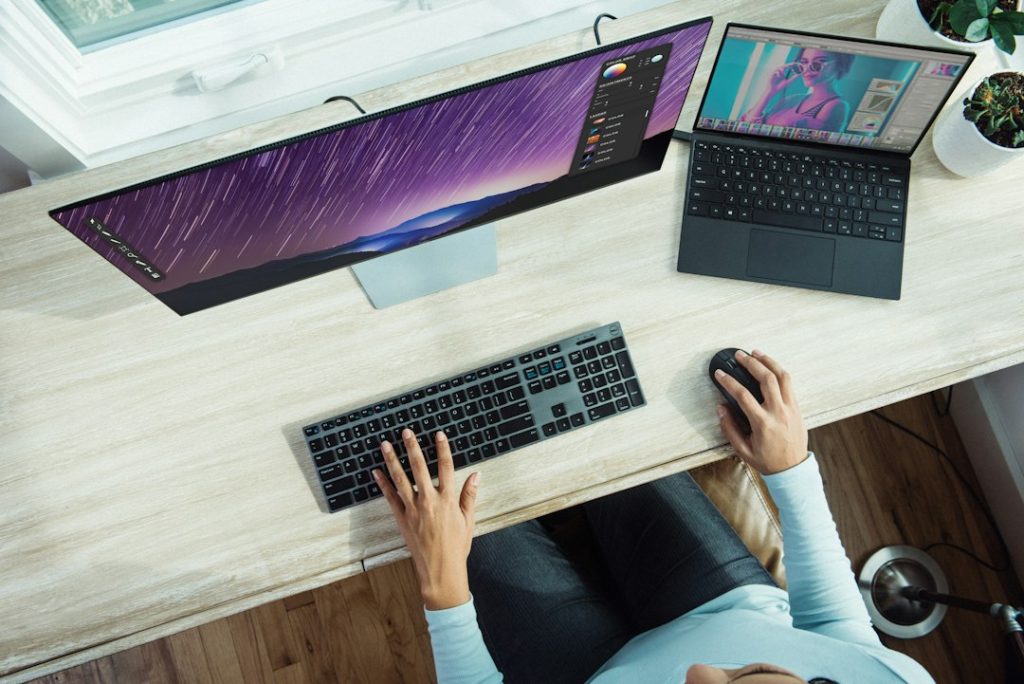
The combination of a sharp 4K display and ample screen real estate makes multitasking a breeze. Users can comfortably arrange multiple application windows side-by-side without feeling cramped. The high pixel density ensures that text remains crisp and readable, reducing eye strain during long work sessions. The integrated KVM switch functionality, accessible via the hub, allows users to control multiple computers with a single keyboard and mouse setup, further enhancing productivity for those managing different systems.
Creative Workflows: Photo and Video Editing on the U2723QE
For photographers and video editors, the U2723QE offers a compelling visual canvas. The high contrast provided by IPS Black brings out subtle details in images and footage that might be lost on standard monitors. The accurate color reproduction means that edits made on this display are likely to translate accurately to other calibrated screens. While the 60Hz refresh rate and response times are not suited for high-frame-rate gaming, they are perfectly adequate for scrubbing through timelines in video editing software or making precise adjustments in photo editing suites.

Gaming and Entertainment: A Surprising Contender?
While not its primary focus, the U2723QE can serve as a capable display for casual gaming and entertainment. The 4K resolution provides stunning visual fidelity in games that support it. The IPS Black technology enhances the viewing experience for movies and shows, offering deeper blacks and better contrast than many competitors. However, the 60Hz refresh rate and moderate response times mean that fast-paced, competitive gaming will be compromised. Esports enthusiasts or hardcore gamers will find themselves better served by dedicated gaming monitors with higher refresh rates and faster response times.
Comparing the U2723QE: Where Does It Stand in 2026?
In the evolving landscape of professional monitors, the U2723QE maintains a strong position, particularly for its integration of advanced display technology and comprehensive connectivity.
U2723QE vs. Previous Ultrasharp Models
Compared to its predecessors, the U2723QE represents a significant leap forward, primarily due to the adoption of IPS Black technology. Earlier Ultrasharp models, while offering excellent color accuracy and build quality, often relied on standard IPS panels with lower native contrast ratios. The U2723QE’s enhanced contrast provides a more immersive and detailed visual experience. Additionally, the expanded USB-C hub capabilities, including higher power delivery and more downstream ports, reflect the increasing demand for streamlined connectivity solutions.
Key Competitors in the 4K USB-C Monitor Market
The 4K USB-C monitor market is competitive, featuring offerings from brands like BenQ, LG, and HP. Competitors often vie for attention with features like higher refresh rates, OLED panels, or even more aggressive pricing. However, the U2723QE’s unique selling proposition remains its IPS Black technology, offering a contrast performance typically found in more expensive VA panels or specialized displays, without sacrificing the viewing angles and color accuracy of IPS. Its robust hub functionality also places it ahead of many competitors that offer fewer ports or lower power delivery via USB-C.
The Dell U2723QE leverages an IPS Black panel, achieving a native contrast ratio of 2000:1, a notable improvement over typical IPS panels which hover around 1000:1. This is achieved through advanced liquid crystal technology and panel structure. Color coverage is specified at 100% sRGB and 98% DCI-P3, with factory calibration aiming for Delta E < 2. The USB-C port provides up to 90W of Power Delivery and supports DisplayPort 1.4 Alt Mode, along with USB 3.2 Gen 2 data speeds. Connectivity includes additional USB-A ports, HDMI 2.0, DisplayPort 1.4 (in and out), and an RJ45 Ethernet port. Brightness is rated at 400 nits typical. Response time is 8ms (Normal) and 5ms (Fast). User feedback commonly praises the deep blacks and extensive connectivity, while some note that gaming performance is secondary to its professional capabilities and that the built-in speakers are rudimentary.
Potential Drawbacks and User Considerations
Despite its strengths, the U2723QE is not without its limitations, and potential buyers should consider these carefully.
What Users Say: Common Praises and Criticisms
Across numerous user reviews and professional assessments, the U2723QE consistently receives high marks for its image quality, particularly the contrast afforded by IPS Black, and its comprehensive connectivity options. The single-cable USB-C solution is frequently cited as a major benefit for decluttering workspaces. Criticisms tend to focus on its price, which positions it at the higher end of the 27-inch 4K monitor market, and its 60Hz refresh rate, which may disappoint users accustomed to smoother motion, especially for gaming. Some users also mention that the OSD (On-Screen Display) controls, while functional, can be slightly less intuitive than desired.
Is the U2723QE Right for Your Setup?
This monitor is an excellent choice for professionals who prioritize image quality, connectivity, and desk organization. Developers, graphic designers, photographers, video editors, and office workers who use a single laptop for most of their tasks will find immense value in the U2723QE. Its ability to charge a laptop, serve as a data hub, and drive a sharp 4K display via a single cable makes it an ideal central component for a clean and efficient workstation. However, if your primary use case involves high-refresh-rate gaming or if you require extreme brightness for HDR content, other specialized monitors might be a better fit, potentially necessitating a separate USB-C dock.
Final Verdict: Dell U2723QE – A Comprehensive 2026 Review
The Dell Ultrasharp U2723QE stands as a highly competent and well-rounded 4K USB-C monitor for the professional user in 2026. Its standout feature, the IPS Black panel, delivers a contrast ratio that breathes new life into detail and depth across all types of content, significantly enhancing the viewing experience beyond standard IPS displays. Coupled with excellent color accuracy, this monitor is a superb tool for creative professionals and productivity-focused users alike.
The integrated USB-C hub is robust, offering high-speed data, significant power delivery, and extensive peripheral connectivity, effectively consolidating workstation essentials into a single-cable solution. Features like daisy-chaining and an integrated Ethernet port further bolster its appeal for complex setups and minimalist desk aspirations. While its gaming performance is secondary due to the 60Hz refresh rate and response times, and its HDR capabilities are limited by peak brightness, these are acceptable trade-offs for a monitor so expertly tuned for productivity and visual fidelity. For professionals seeking a premium, versatile, and highly capable display that simplifies their workflow, the Dell U2723QE remains a top-tier recommendation.