The persistent myth that portable hard drives (HDDs) are mere relics destined for the digital graveyard is just that – a myth. While solid-state drives (SSDs) have undeniably captured the performance crown, the humble HDD continues to offer a compelling blend of massive capacity and wallet-friendly pricing. For professionals and creators, the choice between a portable SSD and HDD in 2026 isn’t about outright technological superiority, but about aligning drive capabilities with specific workflow demands and budget realities. This deep dive dissects the critical differences in speed, physical durability, cost per gigabyte, and real-world application to help you make the most informed decision.
The Core Differences: Speed, Durability, and Cost Breakdown
At their heart, portable SSDs and HDDs operate on fundamentally different principles, leading to distinct advantages and disadvantages. Understanding these core mechanical and electronic distinctions is paramount to appreciating their performance characteristics.
Blazing Fast: Understanding SSD Transfer Speeds
Solid-state drives eschew moving parts entirely. They store data on interconnected flash memory chips, accessed via a controller. This lack of mechanical latency is the primary driver behind their blistering speeds. For portable SSDs, especially those leveraging the NVMe protocol and USB 3.2 Gen 2×2 or Thunderbolt interfaces, sequential read/write speeds can easily surpass 1000 MB/s, with high-end models pushing towards 2000 MB/s or even higher. This translates to near-instantaneous file transfers, rapid application loading, and smooth handling of large, demanding files like 4K video or extensive RAW photo catalogs. The performance ceiling for SSDs continues to climb with each generation of NAND flash and interface technology.
The Steady Workhorse: HDD Transfer Speeds Explained
Portable HDDs, conversely, rely on spinning magnetic platters read and written by a moving actuator arm. This mechanical process inherently introduces latency. While modern HDDs have significantly improved, their typical sequential read/write speeds usually range from 100 MB/s to 160 MB/s, depending on the drive’s RPM (revolutions per minute) and density. This is a fraction of what portable SSDs offer. For everyday tasks like transferring documents, photos, or smaller media files, the difference might not be immediately apparent. However, when dealing with large video projects, massive datasets, or numerous small files, the HDD’s mechanical limitations become a noticeable bottleneck, leading to longer wait times.

Built Tough: Physical Durability Factors
The absence of moving parts in SSDs makes them inherently more resilient to physical shock, vibration, and drops. A dropped SSD is far less likely to suffer data loss or mechanical failure compared to a dropped HDD. The delicate read/write heads in an HDD can easily misalign or even crash onto the platters when subjected to impact, potentially leading to catastrophic data loss. While many portable HDDs come with ruggedized casings or internal shock-dampening mechanisms, they can never match the inherent robustness of an SSD. This makes SSDs the superior choice for users who frequently transport their drives in less-than-ideal conditions, such as field photographers, journalists, or frequent travelers.
Price Per Gigabyte: Making the Budget-Conscious Choice
When capacity is king and budget is a primary concern, the cost per gigabyte becomes the deciding factor. Historically, HDDs have held a significant advantage in this arena, a gap that, while narrowing, still persists.
SSD Cost Analysis: Where the Investment Goes
The advanced technology, complex manufacturing processes, and higher demand for NAND flash memory contribute to the higher cost of SSDs. While prices have plummeted over the years, portable SSDs remain notably more expensive per gigabyte than their HDD counterparts. A 1TB portable SSD might cost anywhere from $70 to $150+, whereas a 1TB portable HDD can often be found for $50 to $80. This premium buys you speed, durability, and lower power consumption, but it comes at a direct cost to raw capacity for a given budget.
HDD Cost Analysis: The Affordable Storage Solution
The mature technology and economies of scale in HDD manufacturing allow for significantly lower production costs. This translates directly into lower prices for consumers, making HDDs an incredibly cost-effective solution for storing vast amounts of data. For users who need to archive large media libraries, back up entire system images, or store extensive game collections, HDDs provide the most storage for the least amount of money. A 4TB or even 5TB portable HDD can be acquired for a price point that would barely yield 1TB or 2TB of SSD storage.
Value Comparison: Cost vs. Performance in 2026
The “value” proposition depends entirely on user priorities. For professionals handling massive video files, running virtual machines, or requiring rapid data access for demanding applications, the speed and efficiency gains of an SSD justify the higher cost per gigabyte. The time saved on transfers and rendering can translate directly into increased productivity and, ultimately, revenue. However, for users whose primary need is simply to store large volumes of data – think photo backups, document archives, or media collections – without needing high-speed access, the HDD offers vastly superior value in terms of raw storage capacity per dollar. The decision hinges on whether you’re paying for speed and resilience, or pure, unadulterated capacity.
Real-World Performance: Benchmarking Portable Drives
Synthetic benchmarks offer a glimpse into potential performance, but real-world usage scenarios paint a more accurate picture of how these drives perform under typical and strenuous conditions.
| Metric | Typical Portable SSD (USB 3.2 Gen 2) | Typical Portable HDD (USB 3.0) | Notes |
|---|---|---|---|
| Sequential Read Speed | 800-1050 MB/s | 100-140 MB/s | Large file transfers |
| Sequential Write Speed | 700-1000 MB/s | 90-130 MB/s | Large file transfers |
| Random Read/Write (IOPS) | ~100,000+ | ~100-200 | Small file operations, OS responsiveness |
| Typical Capacity Range | 500GB – 4TB | 1TB – 5TB+ | Consumer market |
| Typical Price per TB | $90 – $180+ | $20 – $40 | Market fluctuations apply |
| Shock Resistance | High (No moving parts) | Moderate (Moving parts vulnerable) | Drop survivability |
| Power Consumption | Lower | Higher | Impacts battery life on portable devices |
Transferring Large Files: SSD vs. HDD Speed Tests
In tests involving transferring a 100GB video file, a high-performance portable SSD consistently completes the task in under 2 minutes, while a typical portable HDD can take upwards of 12-15 minutes. This significant difference is crucial for video editors, photographers, or anyone frequently moving large project files. The SSD’s ability to sustain high transfer rates means less time waiting and more time creating or working.

Repeated Use & Stress Tests: Durability in Practice
Beyond single large transfers, consider continuous read/write cycles. SSDs excel here, maintaining consistent speeds with minimal thermal throttling in well-designed enclosures. HDDs, however, can become slower under sustained load and are more susceptible to wear and tear from constant mechanical operation. Drop tests invariably favor SSDs; while some HDDs might survive a short fall, especially if not operating, the risk of damage is significantly higher. Anecdotal evidence from professionals often highlights SSDs surviving accidental knocks or minor tumbles that would likely incapacitate an HDD.
Use Case Scenarios: Editing, Backup, and General Storage
Video/Photo Editing: For professionals working with high-resolution footage or large RAW files, a portable SSD is almost a necessity. Editing directly from an SSD dramatically improves timeline scrubbing, rendering speeds, and overall responsiveness.
System Backups: For full system image backups where speed is less critical than capacity and cost, a portable HDD is an excellent choice. Storing multiple large backups becomes economically feasible.
General Storage & Portability: For carrying documents, presentations, music libraries, or less demanding media files, both drive types suffice. However, if the drive will be frequently moved, jostled, or used in environments where drops are possible, the SSD’s durability is a significant advantage.
Key Considerations for Remote Work Lifestyles
The rise of remote and hybrid work models places new demands on portable storage. Reliability, portability, and seamless integration are paramount when your office can be anywhere.
Portability and Power: Battery Life and Size Impact
SSDs generally consume less power than HDDs due to the lack of spinning motors. This translates to slightly better battery life for laptops when an external SSD is in use. Furthermore, portable SSDs are often significantly smaller and lighter than portable HDDs, making them easier to slip into a bag or even a pocket. This is a considerable advantage for digital nomads or those who frequently work from various locations.
Reliability on the Go: Drive Survivability in Transit
The inherent durability of SSDs makes them exceptionally reliable for remote workers. The risk of data corruption or drive failure due to bumps, vibrations, or minor impacts during transit is substantially lower. For someone relying on their portable drive for critical project files while traveling or working from a coffee shop, the peace of mind an SSD offers is invaluable. While HDDs have improved, they remain inherently more fragile.

Software and Compatibility: Seamless Integration
Both SSDs and HDDs typically offer broad compatibility across Windows, macOS, and Linux operating systems, especially when formatted using common file systems like exFAT. Many manufacturers bundle useful software with their drives, such as backup utilities or encryption tools. Some high-end portable SSDs leverage advanced features like hardware encryption, which can be a crucial consideration for professionals handling sensitive data. Ensure the drive’s interface (USB-A, USB-C, Thunderbolt) matches your devices’ ports for optimal performance and ease of use.
Top Portable SSD and HDD Models for 2026
The market is flooded with options, but a few models consistently rise to the top, offering a blend of performance, reliability, and value.
Leading Portable SSDs: Samsung T7 Shield, SanDisk Extreme Portable SSD V2, Crucial X8
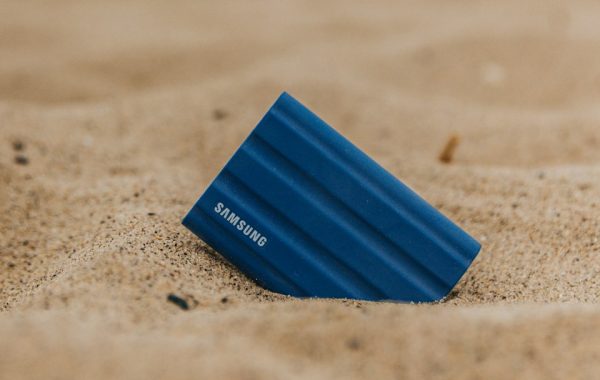
The Samsung T7 Shield is lauded for its rugged, IP65-rated design, offering excellent water and dust resistance alongside its impressive speeds (up to 1050 MB/s read/write). The SanDisk Extreme Portable SSD V2 is another popular choice, balancing speed (up to 1050 MB/s read, 1000 MB/s write) with a durable, rubberized coating. The Crucial X8 offers strong performance (up to 1050 MB/s read) at a slightly more aggressive price point, making it a great value option for high-speed portable storage.
Top Portable HDDs: Western Digital My Passport, Seagate Portable Drive, LaCie Rugged
The Western Digital My Passport series remains a go-to for reliable, high-capacity portable storage at an affordable price, typically offering speeds around 130 MB/s. The Seagate Portable Drive offers similar performance and capacity options, often at competitive price points. For those needing enhanced durability in an HDD, the LaCie Rugged line, often featuring aluminum cases and rubber bumpers, provides a more robust, albeit pricier, HDD solution for field use.
Honorable Mentions and Emerging Technologies
Keep an eye on interfaces like USB 4 and Thunderbolt 4, which enable even higher speeds for portable SSDs, blurring the lines with internal storage. While still niche, portable SSHDs (Solid-State Hybrid Drives) attempt to combine SSD caching with HDD capacity, though they haven’t gained widespread traction for mainstream portable use. As NAND flash technology evolves, expect SSD prices to continue to fall, potentially making capacity less of a differentiating factor in the coming years.
Making Your Decision: Which Drive Reigns Supreme for You?
The ultimate choice between a portable SSD and HDD is deeply personal, dictated by your specific needs, workflow, and financial constraints.
For the Speed-Demanding Professional: Why SSD Wins
If your livelihood depends on rapid data access – be it editing 8K video, working with massive CAD files, running virtual machines, or developing software – the performance uplift of an SSD is non-negotiable. The time saved directly translates to increased productivity and efficiency, making the higher cost per gigabyte a justifiable business expense. The enhanced durability also provides critical peace of mind when working on the go.
SSD Pros
- Significantly faster transfer and access speeds.
- Superior shock and drop resistance.
- Lower power consumption.
- Smaller and lighter form factors.
SSD Cons
- Higher cost per gigabyte.
- Potential for data loss on catastrophic failure (though rare).
For the Bulk Storage User: Why HDD Still Matters
When your primary requirement is storing terabytes of data affordably – for backups, archiving photos and videos, or housing extensive media libraries – the HDD remains the champion. The cost savings are substantial, allowing you to acquire significantly more storage capacity for the same budget. For tasks where speed is not the bottleneck, and the drive remains relatively stationary, the HDD offers unmatched value.
HDD Pros
- Significantly lower cost per gigabyte.
- Vast capacities readily available at lower price points.
- Mature and well-understood technology.
HDD Cons
- Much slower transfer and access speeds.
- Vulnerable to physical shock and drops.
- Higher power consumption and heat generation.
- Larger and heavier than comparable SSDs.
The Hybrid Approach: Balancing Needs and Budget
Many users benefit from employing both types of drives. Use a fast, durable portable SSD for your active projects, operating system, and frequently accessed files. Simultaneously, maintain a high-capacity portable HDD for backups, archiving, and less frequently accessed data. This strategy leverages the strengths of each technology, providing a balanced solution that optimizes both performance and cost-effectiveness for a diverse range of tasks.
Expert FAQ: Portable Drive Questions Answered
Can SSDs really be damaged by drops?
While SSDs are vastly more resistant to physical shock than HDDs due to their lack of moving parts, they are not indestructible. A severe drop onto a hard surface, especially if the drive’s enclosure or internal connections are weak, *can* still cause damage or data corruption. However, the probability of catastrophic failure from a typical accidental drop is significantly lower than with an HDD.
How does humidity affect portable drives?
Both SSDs and HDDs can be affected by extreme humidity or condensation. For HDDs, moisture can potentially lead to platter damage or corrosion of internal components. For SSDs, while less susceptible to mechanical issues, extreme moisture could potentially affect the delicate circuitry or solder points over long-term exposure. Storing drives in a dry environment is always recommended.
What is the average lifespan of each drive type?
The lifespan of an SSD is typically measured in Terabytes Written (TBW). High-quality consumer SSDs often have TBW ratings ranging from 300 TBW for smaller capacities up to 1200 TBW or more for larger ones. For typical daily use, this translates to many years, often exceeding 5-10 years. HDDs, on the other hand, are more prone to mechanical failure over time. While they can last for many years under ideal conditions, a failure can occur unexpectedly due to component wear. Their lifespan is often measured in Mean Time Between Failures (MTBF), but real-world usage, environmental factors, and physical handling play a significant role.
Is it worth upgrading to an SSD for casual use?
If “casual use” involves tasks like word processing, web browsing, and occasional photo storage, the performance difference might not be dramatically noticeable or worth the premium cost of an SSD solely for that purpose. However, if your casual use includes editing photos, managing large media libraries, or even just a desire for a snappier overall system experience, then upgrading to an SSD, even for casual use, can provide a significant and appreciated boost in performance and responsiveness.
👑 Ultimate Winner: It Depends on Your Needs
There is no single “Ultimate Winner” between portable SSDs and HDDs in 2026. The choice is entirely workflow-dependent. For professionals demanding speed, resilience, and portability for active projects, the Portable SSD (specifically models like the Samsung T7 Shield or SanDisk Extreme) is the clear winner. Its performance and durability justify the higher cost. For users prioritizing maximum storage capacity at the lowest cost, particularly for backups and archiving, the Portable HDD (like the WD My Passport or Seagate Portable Drive) remains the undisputed value champion. Employing a hybrid strategy, utilizing both types of drives for their respective strengths, often represents the most practical and cost-effective solution for a broad range of users.