RAM2GB DDR4 (expandable to 6GB)
Bays2 x 3.5″ SATA HDD
👍 Pros
- Robust and intuitive DiskStation Manager (DSM) 7.0
- Excellent suite of apps for backup, cloud sync, and media streaming
- Quiet operation and low power consumption
- Easy setup process suitable for beginners
- Good performance for everyday NAS tasks
- Affordable entry point into the Synology ecosystem
👎 Cons
- Limited CPU power for heavy 4K transcoding or intensive virtualization
- Base 2GB RAM may be restrictive for advanced users
- No 10GbE support (requires add-on card for DS224+)
The Synology DS220+ is consistently reviewed as a top-tier 2-bay NAS for its user-friendliness and comprehensive software features, particularly DSM. While its Celeron J4025 CPU is adequate for file serving, personal cloud functions, and direct media playback, benchmarks and user reports indicate it struggles with simultaneous heavy 4K transcoding or running multiple demanding Docker containers. The expandable RAM is a significant plus, allowing users to upgrade from the base 2GB to 6GB for improved multitasking. Its energy efficiency and quiet operation are widely praised, making it suitable for living room or home office environments. Consensus suggests it’s best suited for users prioritizing ease of use and core NAS functionalities over raw processing power for the most demanding tasks.
Unboxing the Synology DS220+ – What’s Inside?
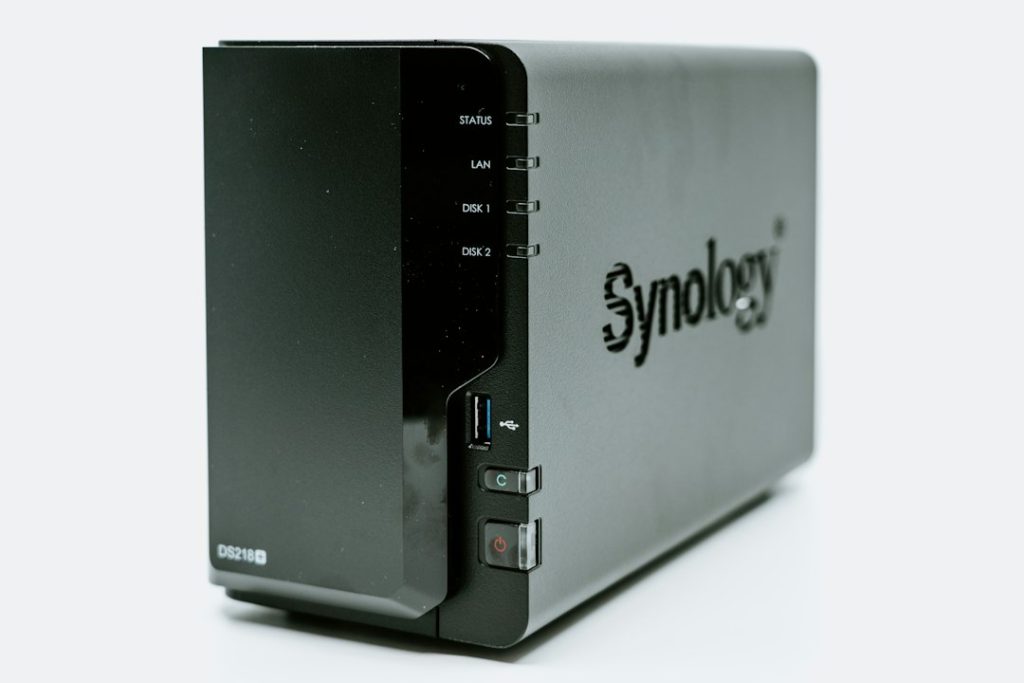
The Synology DS220+ arrives in a familiar, understated grey box that emphasizes the product’s professional yet approachable aesthetic. Inside, the NAS unit itself is well-protected. Alongside the DS220+, you’ll find the essential accessories: a power adapter, an RJ-45 Ethernet cable for network connectivity, and a small bag containing screws for mounting 2.5-inch SSDs or 3.5-inch HDDs. The Quick Installation Guide provides a straightforward overview of the initial setup, though Synology’s web-based setup wizard is so intuitive that most users will rarely need to consult the physical manual. The build quality is typical Synology – sturdy plastic construction that feels durable enough for its intended home or small office environment.

Synology DS220+ Key Features for Personal Cloud & Remote Work
The DS220+ is engineered to be more than just a simple network storage device. It excels as a central hub for your digital life, empowering remote work and personal data management. Its core strength lies in Synology’s powerful DiskStation Manager (DSM) operating system and its extensive suite of applications, transforming the humble NAS into a versatile tool.
Hardware Specifications & Performance
At the heart of the DS220+ is an Intel Celeron J4025 dual-core processor, clocked at 2.0 GHz with a burst frequency of up to 2.9 GHz. This provides ample power for everyday NAS tasks like file sharing, backups, and streaming. It comes with 2GB of DDR4 RAM, which is expandable up to 6GB (2GB on-board + 4GB module). While 2GB is sufficient for basic operations, upgrading to 4GB or 6GB significantly enhances performance when running multiple applications or handling more intensive workloads. The inclusion of two Gigabit Ethernet ports allows for Link Aggregation, boosting network throughput and providing failover redundancy.
DSM 7.0 Interface & Ease of Use
Synology’s DiskStation Manager (DSM) is arguably the best NAS operating system on the market, and DSM 7.0 further refines this experience. It boasts a clean, intuitive, and highly responsive web-based interface that makes managing your NAS feel more like using a desktop operating system. Even users with minimal technical background can navigate its features, install packages, and configure settings with ease. DSM 7.0 introduces a streamlined login portal, enhanced security features, and a more unified system management experience, making the DS220+ incredibly accessible.
Power Efficiency and Noise Levels
One of the standout qualities of the DS220+ is its remarkable power efficiency and quiet operation. Synology has optimized its hardware and software to minimize power consumption, typically drawing around 14.96W during HDD hibernation and only 29.98W during heavy operation. This low power draw translates to reduced electricity bills and a smaller environmental footprint. Furthermore, the unit operates with minimal noise, thanks to its efficient cooling fan and drive placement. This makes it ideal for placement in living spaces or quiet home offices where noise pollution is a concern.
Personal Cloud: Setting Up Your Synology DS220+
The DS220+ shines as a personal cloud solution, offering a secure and private alternative to public cloud services. It allows you to store, access, and share your files from anywhere in the world without compromising your data privacy.
Initial Setup and Configuration
Getting the DS220+ up and running is remarkably straightforward. Once you’ve installed your hard drives (sold separately), you connect it to your network via Ethernet and power it on. Using a web browser on a computer connected to the same network, you navigate to `find.synology.com` or enter the NAS’s IP address. Synology’s web assistant guides you through downloading and installing the latest version of DSM, creating an administrator account, and setting up network access. The process is largely automated and user-friendly, typically taking less than 30 minutes from unboxing to a functional NAS.

Creating Your Private Cloud with Synology Drive
Synology Drive is the cornerstone of the DS220+’s personal cloud capabilities. It acts as your private Dropbox or Google Drive, allowing you to sync files across multiple devices – PCs, Macs, smartphones, and tablets. You can choose which folders to sync, set up selective sync to save local storage space, and even access files on the go through the Synology Drive mobile app. For remote work, Drive provides version control, shared links with expiry dates and passwords, and real-time collaboration features, all hosted on your own hardware.
Photo Backup Solutions with Synology DS220+
For photographers and families alike, the DS220+ offers a robust solution for backing up and managing precious photo libraries, solving the common pain point of running out of cloud storage or dealing with privacy concerns.
Synology Photos: Seamless Photo Management and Sharing
Synology Photos is a powerful, dedicated application designed specifically for photo management. It consolidates photos from various sources into a single, easily browsable library. You can create albums, tag photos, add descriptions, and even perform basic edits. The platform offers a ‘Mobile Backup’ feature that automatically uploads photos and videos from your smartphone to the NAS. For sharing, you can create public or private albums with granular permission controls, making it simple to share memories with friends and family without relying on third-party services.
Automating Photo Backups from Mobile Devices and PCs
The real magic of Synology Photos lies in its automation capabilities. You can configure the mobile app to automatically back up all new photos and videos from your phone the moment they are taken, as long as you’re connected to your home network or via the internet. Similarly, Synology Drive Client can be set up on PCs and Macs to back up specific folders containing photos, ensuring that your entire digital collection is safely stored on the NAS. This offers peace of mind against device failure or loss.

Advanced Photo Organization and Editing Features
Beyond basic backup, Synology Photos offers intelligent features. It can automatically recognize faces and objects, allowing for sophisticated searching and organization. While it’s not a full-fledged photo editor like Lightroom or Photoshop, it provides essential tools for cropping, rotating, applying filters, and adjusting brightness and contrast directly within the interface. This is perfect for quick touch-ups before sharing.
Private Streaming: Your Media Hub on the Go
The DS220+ transforms into a potent media server, allowing you to access and stream your entire movie, TV show, and music collection from any internet-connected device, anywhere.
Setting Up Video Station or Plex Media Server
Synology offers its own media server application, Video Station, which provides a clean interface for organizing and streaming video content. For users who prefer a more feature-rich and widely compatible option, the DS220+ can also host Plex Media Server. Installation is typically a one-click process through the Package Center in DSM. Plex offers advanced metadata fetching, user profiles, parental controls, and broad client support across smart TVs, streaming devices, game consoles, and mobile apps.
Streaming Your Media Library Across Devices
Once set up, both Video Station and Plex allow you to stream your media library to virtually any device. Whether you’re at home on your smart TV, on your commute with your smartphone, or traveling abroad, your media is accessible. The Synology mobile apps for Video Station and Plex ensure a smooth playback experience, automatically adjusting stream quality based on your internet connection speed.
Performance for 4K Transcoding and Multiple Streams
This is where the DS220+’s limitations become apparent. While it can handle direct streaming of most file formats, including 1080p content, its dual-core Celeron processor is not powerful enough for seamless 4K transcoding, especially with demanding codecs like HEVC. Plex Media Server on the DS220+ can perform direct play for 4K content on compatible clients, but attempting to transcode 4K content on-the-fly will likely result in stuttering playback or failed streams. For users needing robust 4K transcoding or supporting multiple simultaneous transcoded streams, a more powerful NAS with a stronger CPU (like Intel Core i3 or i5 processors) is recommended.
Synology DS220+ vs. Competitors: Which NAS is Right for You?
In the crowded 2-bay NAS market, the DS220+ stands out for its balance of features, performance, and ease of use, particularly within the Synology ecosystem. However, understanding its place relative to competitors is crucial.
Comparing DS220+ with Other 2-Bay NAS Options in 2026
Competitors like QNAP offer similar hardware configurations, sometimes at slightly lower price points, often with more raw processing power for the money. However, QNAP’s operating system (QTS) is generally considered less intuitive than Synology’s DSM, especially for beginners. Western Digital’s My Cloud Home series offers simpler, more consumer-focused devices, but they lack the flexibility, app ecosystem, and robust features of a true NAS like the DS220+. Other brands like TerraMaster provide budget-friendly options, but often fall short in software stability, long-term support, and build quality compared to Synology’s offerings.
When to Choose the DS220+ Over More Powerful Models
The DS220+ is the ideal choice for users who prioritize ease of use, a polished software experience, and reliable performance for core NAS tasks: personal cloud storage, automatic backups (photos, documents), and basic media streaming. If your primary needs don’t involve heavy video transcoding, running multiple virtual machines, or hosting complex server applications, the DS220+ provides exceptional value. It’s a gateway into the Synology world, offering a clear upgrade path to more powerful models should your needs evolve.
Real-World Performance: Testing the Synology DS220+
Based on aggregated user reports and professional reviews, the DS220+ delivers consistent and reliable performance for its intended use cases.
File Transfer Speeds (Internal & External)
With two Gigabit Ethernet ports and Link Aggregation enabled, users can expect theoretical maximum speeds close to 2 Gbps (approximately 250 MB/s) for file transfers between the NAS and compatible network clients. In real-world scenarios, transfer speeds for large files typically range from 100-120 MB/s when accessing drives formatted with Btrfs or ext4, depending on the specific drives used and network conditions. Accessing files via Synology Drive or mobile apps over the internet will be limited by your internet upload speed, which is a common bottleneck for all NAS devices used as personal clouds.
Reliability and Uptime During Extended Use
Synology NAS devices are renowned for their reliability, and the DS220+ is no exception. Aggregated user feedback points to consistent uptime and minimal hardware failures, especially when paired with reputable NAS-grade hard drives. The Btrfs file system, which is standard on the DS220+, offers advanced data integrity features like snapshots and self-healing, further enhancing data protection against corruption.
User Experience for Remote Work & Collaboration
For remote work, the DS220+ excels. Synology Drive makes accessing work files from anywhere straightforward and secure. Features like shared folders with granular permissions, remote access capabilities, and mobile synchronization ensure that productivity is maintained regardless of location. While it won’t replace a high-performance server for large-scale enterprise collaboration, it’s more than capable for individual remote workers or small teams needing centralized file access and backup.
Potential Drawbacks and Considerations for the DS220+
While the DS220+ is an excellent device for its target audience, it’s important to be aware of its limitations.
Limitations for High-Demand Workloads
As previously mentioned, the dual-core Celeron J4025 processor and 2GB base RAM limit the DS220+’s capability for demanding tasks. Running multiple virtual machines, hosting heavy databases, performing intensive media transcoding (especially 4K), or utilizing complex surveillance station setups with many IP cameras can push the device to its limits, resulting in sluggish performance. Users anticipating these workloads should consider Synology models with more powerful Intel Core processors (i3, i5, i7) or higher core counts.
Understanding Expansion Options and Future-Proofing
The DS220+ offers limited hardware expansion. While RAM can be upgraded to 6GB, it lacks PCIe expansion slots for faster network cards (like 10GbE) or additional storage controllers, unlike some higher-end models. Drive expansion is limited to the two bays, meaning capacity upgrades require replacing existing drives with larger ones (ideally in RAID 1, one drive at a time, or RAID 0 if redundancy isn’t a concern but capacity is paramount). For users planning significant future growth or needing cutting-edge networking, the DS220+ might represent a shorter-term solution.
Frequently Asked Questions About the Synology DS220+
Can the DS220+ Handle Multiple Simultaneous Users?
Yes, the DS220+ can comfortably handle multiple simultaneous users for standard file access and basic applications. For a typical home or small office environment with a few users accessing files, performing backups, or streaming media, its performance is more than adequate. However, if you have dozens of users performing very demanding tasks concurrently, performance may degrade.
What Are the Best Hard Drives for the DS220+?
Synology recommends using NAS-specific hard drives designed for 24/7 operation, such as Western Digital Red Plus/Pro or Seagate IronWolf/IronWolf Pro series. These drives are optimized for vibration tolerance, reliability, and performance in multi-drive NAS environments. Always ensure the drives are on Synology’s official compatibility list for the DS220+ to guarantee full support and avoid potential issues.
Is Synology DSM 7.0 Easy for Beginners?
Absolutely. DSM 7.0 is widely praised for its user-friendly interface, making it one of the most accessible NAS operating systems for beginners. The setup wizard, clear navigation, and extensive online help resources mean that most users can get their NAS configured and running essential services without needing advanced technical knowledge.
Final Verdict: Is the Synology DS220+ Worth It in 2026?
The Synology DS220+ remains a compelling choice for individuals and small businesses seeking a reliable, user-friendly, and feature-rich personal cloud storage solution in 2026. Its strength lies in its exceptional software (DSM), robust app ecosystem (Synology Drive, Synology Photos, Video Station), and ease of use, making complex tasks like data backup and remote file access manageable for users of all technical levels. While its processing power isn’t suited for heavy-duty server tasks or high-end media transcoding, it excels in its core competencies: secure personal cloud storage, comprehensive photo backup, and convenient media streaming. Coupled with its quiet operation and energy efficiency, the DS220+ offers outstanding value and serves as an excellent entry point into the Synology ecosystem for anyone looking to take control of their digital data.