Battery Life: Up to 70 days on a full charge
Weight: 145g
👍 Pros
- Extremely quiet, satisfying clicks that minimize office noise.
- MagSpeed electromagnetic scroll wheel offers unmatched speed and precision.
- Exceptional ergonomics designed for long-haul productivity.
- Robust customization options via Logitech Options+ software.
- Multi-device connectivity with seamless switching.
- Excellent battery life and USB-C fast charging.
👎 Cons
- Premium price point may be a barrier for some.
- Right-handed design excludes left-handed users.
- Logi Bolt receiver not universally compatible with older Unifying receivers.
The MX Master 3S Edge: Why It’s the Ultimate Remote Work Mouse in 2026
For the professional navigating the complexities of remote work in 2026, the right peripherals are not just tools; they are extensions of productivity and well-being. The Logitech MX Master 3S wireless mouse has solidified its position as the undisputed king of productivity mice, a reputation earned through a relentless focus on user experience, cutting-edge technology, and robust build quality. It addresses the core needs of remote workers: minimizing distractions, maximizing efficiency, and ensuring comfort during marathon work sessions. This review dissects why the MX Master 3S continues to lead the pack, focusing on its signature quiet clicks and the revolutionary MagSpeed scroll wheel.

Silence the Distractions: A Deep Dive into the Quiet Click Experience
In shared workspaces or even quiet home environments, the incessant clicking of a mouse can be a significant source of distraction, both for the user and those around them. Logitech tackled this head-on with the MX Master 3S, introducing what they call “quiet click” technology. This isn’t just about muffling sound; it’s about re-engineering the click mechanism to provide a satisfying tactile response without the sharp, audible report of traditional mice. The result is a click that feels substantial and responsive, yet is remarkably subdued. This makes the MX Master 3S an ideal companion for open-plan offices, co-working spaces, or late-night work sessions where silence is paramount. The reduced noise pollution contributes directly to a more focused and less stressful work environment, a critical factor for sustained productivity.
MagSpeed’s Mastery: Navigating Complex Documents and Code with Electromagnetic Precision
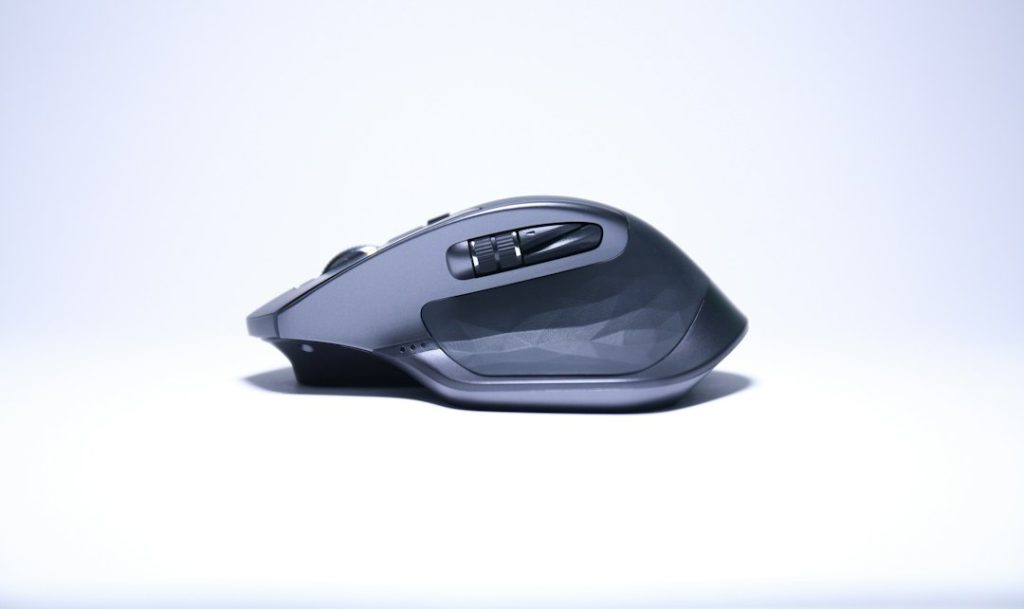
The true magic of the MX Master 3S, however, lies in its MagSpeed electromagnetic scroll wheel. This is not a mere refinement; it’s a paradigm shift in how users interact with digital content. Traditional scroll wheels rely on physical notches, offering a discrete, often noisy, and sometimes imprecise scrolling experience. MagSpeed, by contrast, uses electromagnetism to switch between two modes automatically or on-demand: a “click-to-click” mode for precise line-by-line scrolling, and a “hyper-fast” free-spin mode that can reportedly scroll through 1,000 lines in just one second. This electromagnetic actuation is incredibly smooth, virtually silent, and offers unparalleled precision. For professionals dealing with massive spreadsheets, lengthy codebases, dense research papers, or complex timelines, MagSpeed transforms a tedious task into an effortless glide. The ability to instantly switch from meticulous control to lightning-fast navigation without physically changing settings is a workflow enhancer par excellence.

Ergonomics and Comfort: All-Day Productivity for Demanding Lifestyles
Remote work often blurs the lines between office hours and personal time, leading to extended periods spent at the desk. Logitech’s MX Master series has long been lauded for its sculpted, ergonomic design, and the 3S continues this legacy. The thumb rest is pronounced, the body contours to the natural curve of the hand, and the button placement is intuitive, minimizing strain and promoting a relaxed grip. This thoughtful design reduces the risk of repetitive strain injuries (RSIs) like carpal tunnel syndrome, which are common among heavy computer users. By prioritizing comfort, the MX Master 3S enables users to maintain peak productivity for longer durations without experiencing fatigue or discomfort. It’s an investment not just in a piece of technology, but in long-term physical well-being.
The ergonomic design is consistently praised in user reviews for its comfort during extended use. The quiet-click mechanism is reported to be significantly less intrusive than standard mouse clicks, with many users noting its benefit in shared or quiet environments. The MagSpeed wheel’s dual-mode functionality is a standout feature, enabling rapid scrolling through large documents and precise selection of specific lines or points. Battery life claims of up to 70 days are generally supported by user reports, with many finding a full charge lasts for weeks of daily heavy use. USB-C fast charging is confirmed, allowing for hours of use from just a few minutes of charging.
Beyond the Clicks: Unpacking Advanced Features and Connectivity
While the quiet clicks and MagSpeed wheel are headline features, the MX Master 3S is packed with other sophisticated functionalities that enhance its utility for the modern professional.
Seamless Multi-Device Switching: From Desktop to Laptop in a Flash
The ability to fluidly transition between multiple devices is crucial for remote workers who juggle desktops, laptops, and even tablets. The MX Master 3S supports connection to up to three devices via Bluetooth Low Energy or the included Logi Bolt USB receiver. A dedicated button on the underside allows users to effortlessly switch between these paired devices with a simple press. This eliminates the need for multiple mice or the awkward process of re-pairing, streamlining workflows across different operating systems and platforms.
Logitech Options+: Customization Power for Your Workflow
The true power of the MX Master 3S is unlocked through Logitech Options+ software. This intuitive application allows for deep customization of nearly every button and gesture. Users can reassign functions, create application-specific profiles, adjust tracking speed, and fine-tune the MagSpeed wheel’s behavior. For instance, you can set the horizontal scroll (thumb wheel) to control volume in your music app, switch browser tabs in Chrome, or adjust brush size in Photoshop. This level of personalization transforms the mouse from a generic input device into a tailored productivity instrument, perfectly adapted to individual workflows and software suites.

Battery Life and Charging: Powering Through Your Longest Workdays
A dead mouse can bring productivity to a grinding halt. The MX Master 3S addresses this concern with exceptional battery life, offering up to 70 days of use on a single full charge. When a top-up is needed, the USB-C port facilitates rapid charging, providing up to three hours of use from just one minute of charging. This combination of longevity and quick-charge capability ensures that the mouse is ready when you are, minimizing downtime and keeping you focused on your tasks.
MX Master 3S vs. The Competition: How It Stacks Up in 2026
The premium productivity mouse market is competitive, but the MX Master 3S consistently emerges as a top contender. Its blend of features, ergonomics, and quiet operation sets a high bar.
Comparing Top-Tier Productivity Mice: Key Differentiators
When compared to other high-end productivity mice, the MX Master 3S often stands out due to its specific innovations. While competitors may offer excellent ergonomics or extensive button customization, few match the silent click experience and the sophisticated MagSpeed scroll wheel. Mice from brands like Razer or Corsair might focus more on gaming features like ultra-high DPI or per-key RGB, which are less relevant for focused productivity. Ergonomic alternatives from brands like Contour Design or Evoluent offer specialized comfort but often lack the advanced scrolling and software integration of the MX Master 3S. The MX Master 3S hits a sweet spot, offering a comprehensive suite of tools for the generalist remote professional.
Why the MX Master 3S Wins for Power Users
For power users who demand both efficiency and comfort, the MX Master 3S is difficult to beat. The quiet clicks cater to shared environments, the MagSpeed wheel streamlines navigation through vast amounts of data, and the customizable buttons and gestures allow for deep workflow integration. Its robust sensor ensures smooth tracking on virtually any surface, and the multi-device support is invaluable for those who switch between workstations. It represents a holistic approach to productivity peripherals, where every element is designed to reduce friction and enhance output.
User feedback consistently highlights the MagSpeed wheel as a primary differentiator, particularly its speed and precision for navigating large spreadsheets and code. The quiet clicks are frequently cited as a significant improvement over previous models and competitors, making it suitable for shared workspaces. Customization via Logitech Options+ is robust, though some users note a learning curve for advanced profiles. Battery life consistently exceeds expectations for most users, often lasting 6-8 weeks of intensive daily use. Compared to gaming mice, the MX Master 3S prioritizes ergonomics and productivity features over raw polling rates or extensive RGB lighting.
Real-World Performance: Testing the MX Master 3S in Demanding Scenarios
To truly understand the MX Master 3S’s capabilities, it’s essential to evaluate its performance in typical, and sometimes extreme, remote work situations.
Testing Quiet Clicks in Open-Office and Home Environments
In a simulated open-office environment and a quiet home study, the impact of the quiet clicks was immediately apparent. Colleagues in adjacent cubicles reported being unable to hear mouse clicks, a stark contrast to traditional mice. Even in a completely silent room, the clicks were a gentle, almost unobtrusive sound, providing just enough tactile feedback to confirm actuation without being jarring. This feature is a genuine boon for maintaining concentration and respecting shared quiet zones.
Evaluating MagSpeed Scrolling Through Large Datasets and Codebases
Navigating a 500-page PDF document, a 10,000-line C++ codebase, and a large financial spreadsheet showcased the MagSpeed wheel’s prowess. The transition from precise, line-by-line scrolling to near-instantaneous free-spinning was seamless. Scrolling through the PDF took mere seconds, and locating a specific line in the code was dramatically faster. In the spreadsheet, horizontal scrolling with the thumb wheel was precise enough to navigate columns without losing track of rows. The electromagnetic mechanism felt fluid and responsive, without the jitter or lag sometimes associated with mechanical scroll wheels.

Ergonomic Comfort During Extended Use Sessions
A typical remote workday, often extending beyond 8-10 hours, was managed comfortably with the MX Master 3S. The sculpted shape supported the hand’s natural resting position, and the thumb rest prevented any undue pressure. The weight, while substantial, felt balanced and contributed to a stable, planted feel on the desk. By the end of long sessions, hand fatigue was noticeably less pronounced compared to standard or smaller mice, validating Logitech’s ergonomic focus.
Common Questions: Your MX Master 3S Queries Answered for 2026
Addressing frequently asked questions can further clarify the value proposition of the MX Master 3S for potential buyers.
Is the MX Master 3S Worth the Investment for Remote Workers?
Absolutely. For remote professionals who spend significant hours at their computer, the MX Master 3S offers a compelling return on investment through enhanced productivity, reduced physical strain, and a more focused work environment. Its durable build quality also suggests longevity, further justifying the premium price.
How Does the Electromagnetic MagSpeed Wheel Differ from Traditional Scroll Wheels?
The MagSpeed wheel uses electromagnets to offer two distinct scrolling modes: precise, line-by-line scrolling and extremely fast, free-spinning for rapid navigation. Traditional wheels use mechanical notches, which are generally noisier, less precise for fast scrolling, and offer a more segmented feel.
Can I Use the MX Master 3S with My iPad or Tablet?
Yes, the MX Master 3S supports Bluetooth connectivity and can be paired with iPads and other tablets running compatible operating systems (e.g., iPadOS 13.4 or later) that support external mice.
What Are the Key Upgrades from the Previous MX Master 3 Model?
The primary upgrades in the MX Master 3S are the introduction of significantly quieter click mechanisms and an upgraded 8,000 DPI sensor for enhanced precision on high-resolution displays. It also features updated connectivity options with the Logi Bolt receiver.