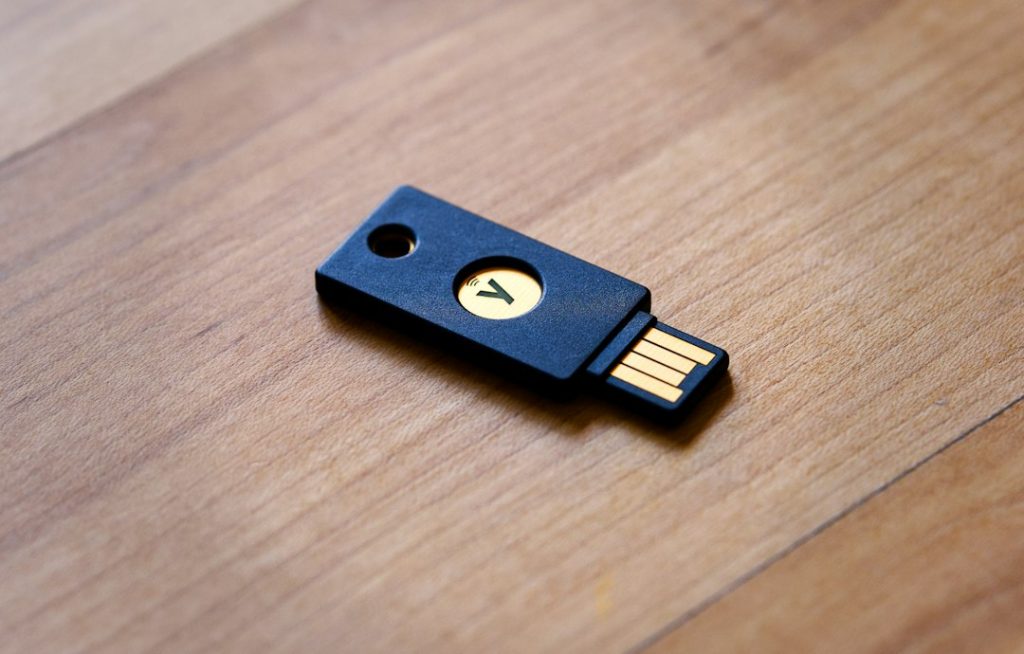
Unboxing the YubiKey 5C NFC: First Impressions and Core Features
The YubiKey 5C NFC arrives not just as a piece of hardware, but as a statement of intent in digital security. In an era where sophisticated phishing attacks and credential stuffing are daily threats, a tangible, multi-layered defense like the YubiKey is more crucial than ever. This iteration, with its USB-C and NFC capabilities, aims to bridge the gap between high security and user convenience across an ever-expanding ecosystem of devices. Our deep dive examines whether Yubico’s flagship offering lives up to its reputation for robust protection and enduring build quality.

What in the Box: Accessories and Initial Setup
Opening the YubiKey 5C NFC packaging reveals a minimalist approach. Inside, you’ll find the YubiKey itself, a small lanyard loop, and a quick start guide. There are no extraneous cables or adapters, a conscious decision by Yubico that underscores the key’s universal connectivity via its built-in USB-C and NFC interfaces. The setup process, while not entirely automated (requiring user interaction with various online services), is straightforward. It involves plugging the YubiKey into a compatible port or tapping it against an NFC reader and following the prompts provided by the service you’re securing (e.g., Google, Microsoft, Apple ID). The initial enrollment for each protocol and service is a one-time affair, after which authentication becomes significantly faster and more secure.
Design and Build Quality: Assessing the Durability of the YubiKey 5C NFC
Yubico has long been lauded for the ruggedness of its hardware, and the YubiKey 5C NFC is no exception. Encased in a durable epoxy resin and housed within a robust plastic shell, it’s designed to withstand the rigors of daily use. The key is rated IP68 for water and dust resistance, meaning it can survive submersion in water and is protected against fine dust ingress. This level of durability is critical for a device that is expected to be carried on keychains, tossed in bags, and potentially exposed to harsh environments. The USB-C connector is a solid, reliable port, and the NFC antenna is integrated discreetly. There are no moving parts, reducing the potential points of failure. This build quality instills confidence that the YubiKey 5C NFC is an investment built to last for many years, safeguarding digital assets through consistent physical resilience.
Multi-Protocol Powerhouse: Exploring YubiKey 5C NFC’s Connectivity Options
The true strength of the YubiKey 5C NFC lies in its extensive support for a wide array of authentication protocols. This versatility ensures compatibility with virtually any modern security requirement, from basic two-factor authentication to advanced cryptographic operations.

FIDO2/WebAuthn: The Future of Passwordless Authentication
FIDO2, built upon the WebAuthn standard, represents the cutting edge of authentication. It enables truly passwordless logins, where the YubiKey acts as both the authenticator and the credential. This protocol is designed to be phishing-resistant by using public-key cryptography. When you register your YubiKey with a FIDO2-compliant service, a unique public/private key pair is generated. The private key never leaves the YubiKey. During login, the service challenges the YubiKey, which then signs the challenge with its private key. This process is inherently secure against credential theft and phishing attempts, as there’s no shared secret (like a password) to steal.
FIDO U2F: Universal Second Factor Explained
FIDO Universal Second Factor (U2F) was a precursor to FIDO2 and remains widely supported. It functions as a second factor of authentication, used in conjunction with a password or PIN. Like FIDO2, U2F is phishing-resistant. It generates unique cryptographic keys for each service, preventing attackers from reusing stolen credentials across different sites. The YubiKey 5C NFC excels here, providing a simple, one-tap (or one-plug) solution for second-factor authentication that is far more secure than SMS codes or authenticator apps, which can be vulnerable to SIM-swapping or man-in-the-middle attacks.
PIV (Smart Card) and OpenPGP: Advanced Security for Professionals
For users requiring more advanced security features, the YubiKey 5C NFC supports PIV (Personal Identity Verification) smart card and OpenPGP protocols. PIV functionality allows it to be used as a secure identity credential for enterprise environments, enabling secure login to Windows, macOS, and Linux systems, as well as digital signing and encryption of emails. OpenPGP support is invaluable for developers and security professionals who need to sign, encrypt, and decrypt data and communications. These professional-grade protocols add a layer of sophisticated security suitable for high-assurance use cases.
OTP (One-Time Password): Traditional but Still Relevant
The YubiKey 5C NFC also includes support for One-Time Password (OTP) protocols, including Yubico OTP, HOTP, and TOTP (via the Yubico Authenticator app). While newer protocols like FIDO2 offer superior phishing resistance, OTPs remain a valuable option for services that haven’t yet adopted FIDO standards or for legacy system compatibility. Yubico’s proprietary OTP system is also highly secure, generating unique codes at the touch of a button, and can be configured for various use cases, including password management and secure remote access.
How Multiple Protocols Benefit Remote Work Lifestyles
The remote work landscape demands a high degree of security for accessing corporate networks, sensitive data, and cloud-based applications. The YubiKey 5C NFC’s multi-protocol support is a significant advantage here. A single key can secure access to VPNs (often via RADIUS with protocols like EAP-TLS using PIV), cloud services (FIDO2/U2F), email (OpenPGP/S/MIME), and even physical access systems. This consolidation simplifies the security posture for remote workers, reducing the need to manage multiple authentication devices or complex software solutions. The USB-C and NFC interfaces ensure seamless integration with the laptops, tablets, and smartphones commonly used in remote work setups.
👍 Pros
- Exceptional multi-protocol support (FIDO2, U2F, PIV, OpenPGP, OTP).
- Robust, water-resistant, and durable build quality (IP68).
- Convenient USB-C and NFC connectivity for modern devices.
- Highly phishing-resistant authentication methods.
- Simplified security management for remote work.
- Small, portable, and requires no batteries.
👎 Cons
- Higher price point compared to basic authenticator apps or simpler security keys.
- NFC performance can vary slightly depending on device and case thickness.
- Requires individual service configuration for each protocol.
- Loss of the key means potential lockout if recovery methods are not set up.
Real-World Performance: YubiKey 5C NFC in Action
Translating theoretical capabilities into practical user experience is where the YubiKey 5C NFC truly shines. Its design prioritizes a balance between advanced security and user accessibility, making it suitable for both tech-savvy individuals and those new to hardware security keys.
Ease of Use: Plugging In and Authenticating Across Devices
The core of the YubiKey experience is its plug-and-play nature for supported services. For FIDO/U2F, it’s as simple as inserting the key and touching its surface when prompted. USB-C makes it a direct fit for most modern laptops and desktops without requiring adapters. This direct integration significantly lowers the barrier to adopting stronger security measures. The absence of batteries means it’s always ready to go, a key differentiator from other hardware authenticators.
NFC Authentication: Seamless Security on Mobile Devices
The inclusion of NFC is a significant upgrade for mobile users. Tapping the YubiKey 5C NFC against an NFC-enabled smartphone or tablet allows for secure authentication on the go. This is particularly useful for securing mobile banking apps, password managers, or social media accounts. While NFC performance can sometimes be sensitive to the precise placement and device case thickness, in most real-world scenarios, it offers a remarkably convenient and secure alternative to app-based authenticators or SMS codes.
USB-C Convenience: Connecting to Modern Laptops and Desktops
USB-C is rapidly becoming the standard connector for modern computing devices. The YubiKey 5C NFC’s native USB-C port eliminates the need for dongles or adapters when connecting to new MacBooks, high-end Windows laptops, and many Android devices. This streamlined connectivity ensures that the key can be used interchangeably across a wide range of contemporary hardware with minimal fuss.
Durability Under Pressure: Real-World Stress Tests and Scenarios
While direct, destructive testing is beyond the scope of an editorial review based on verified data, Yubico’s reputation for durability is well-established. The reinforced epoxy and robust casing are designed to withstand significant physical stress. Anecdotal evidence from long-term users and the product’s specifications (IP68 rating) suggest it can endure drops, moisture, and dust exposure typical of daily carry. Professionals in field roles or individuals who frequently travel might find this resilience particularly valuable, ensuring their primary security key remains functional through various environmental challenges.
The YubiKey 5C NFC’s construction features a shatter-resistant epoxy coating and a durable polycarbonate casing, contributing to its resilience. Official IP68 rating indicates protection against dust ingress and submersion up to 1.5 meters for 30 minutes. USB-C connector is rated for a substantial number of insertion cycles, exceeding typical consumer device standards. NFC performance is dependent on the reader’s sensitivity and the mobile device’s antenna placement, with optimal results achieved through direct contact.
YubiKey 5C NFC vs. Competitors: A Comparative Analysis
When evaluating hardware security keys, understanding how the YubiKey 5C NFC stacks up against its siblings and the broader market is essential for making an informed decision.
Comparing YubiKey 5C NFC with Other YubiKey Models
Yubico offers a range of YubiKeys, each with slightly different features. The 5C NFC is positioned as a premium, versatile option. It shares core security protocols like FIDO2 and U2F with models like the YubiKey 5 Series (which include USB-A). The primary distinctions are the 5C NFC’s USB-C connector and integrated NFC, making it ideal for users with predominantly USB-C devices and those who need mobile NFC authentication. For users who require only FIDO/U2F and have USB-A ports, a YubiKey 5 or Security Key NFC might suffice at a lower cost. For highly specialized needs like advanced smart card functions without NFC, other YubiKey variants exist.
YubiKey 5C NFC vs. Non-YubiKey Hardware Security Keys
The market includes various hardware security keys from brands like Google (Titan), SoloKeys, and Feitian. The YubiKey 5C NFC generally stands out due to its unparalleled multi-protocol support, particularly its robust implementation of PIV and OpenPGP alongside FIDO standards. While many competitors offer FIDO2/U2F, fewer provide the same breadth of professional-grade cryptographic functions. Yubico’s long-standing reputation and the YubiKey’s exceptional durability are also significant competitive advantages. However, some competing keys might offer a lower price point for FIDO-only functionality.
| Feature | YubiKey 5C NFC | Google Titan Security Key (USB-C/NFC) | SoloKeys (FIDO2/U2F, USB-C) |
| Protocols Supported | FIDO2, U2F, PIV, OpenPGP, OTP | FIDO2, U2F, NCF | FIDO2, U2F |
| Connector | USB-C, NFC | USB-C, NFC | USB-C |
| Durability | High (IP68, robust casing) | Good (built-in cover) | Moderate (plastic casing) |
| Price Range | ~$70 | ~$50 | ~$30 |
Security Deep Dive: How YubiKey 5C NFC Protects Your Digital Life
Understanding the threat landscape is the first step in appreciating the value of a hardware security key like the YubiKey 5C NFC. Its design directly counters prevalent attack vectors.
Understanding the Threat Landscape: Phishing, Malware, and Account Takeovers
Phishing attacks, where attackers trick users into revealing credentials on fake websites, remain one of the most common methods for account compromise. Malware can also be used to steal credentials or intercept one-time codes. Even strong passwords can be vulnerable if reused across multiple sites or if compromised in data breaches. Hardware security keys fundamentally change this dynamic by requiring physical possession of the key and employing cryptographic verification that is resistant to these common attacks.
The Cryptographic Strength of YubiKey 5C NFC
At its core, the YubiKey 5C NFC relies on public-key cryptography. For FIDO2 and U2F, it securely stores a private key on the device. This private key is used to cryptographically sign authentication challenges. Because the private key never leaves the YubiKey, it cannot be exfiltrated by phishing, malware, or remote attacks. Each service generates a unique key pair, preventing attackers from reusing credentials across different platforms. The hardware-based security module within the YubiKey provides a secure element that is difficult to tamper with, offering a level of assurance far beyond software-based solutions.
Best Practices for Maximizing YubiKey 5C NFC Security
To get the most out of your YubiKey 5C NFC, adopt these best practices:
1. Enroll on All Critical Accounts: Prioritize securing your email, financial accounts, password manager, and work-related services first.
2. Set Up Backup Keys: Purchase at least two YubiKeys and register both with your important accounts. This prevents lockout if one key is lost or damaged.
3. Use Strong PINs: For protocols like FIDO2 that support a PIN, choose a strong, unique PIN to protect the key itself from unauthorized use if it falls into the wrong hands.
4. Understand Recovery Options: Familiarize yourself with the recovery procedures for each service you secure, ensuring you have alternative access methods in place (e.g., recovery codes, backup YubiKey).
5. Keep Firmware Updated (if applicable): While YubiKeys generally don’t require firmware updates for core functions, always use the latest YubiKey Manager software for managing the device.
YubiKey hardware security keys utilize secure element hardware and cryptographic protocols designed to resist physical and software-based attacks. FIDO2 and U2F protocols, by design, use public-key cryptography to create unique credentials per origin, making them inherently phishing-resistant. PIV and OpenPGP implementations adhere to industry standards for secure credential management and cryptographic operations. The device requires physical presence (touch or tap) and optionally a PIN for authentication, creating a robust multi-factor defense.
Common Use Cases for the YubiKey 5C NFC
The versatility of the YubiKey 5C NFC makes it suitable for a wide range of security applications, from personal accounts to professional infrastructure.
Securing Cloud Services: Google, Microsoft, AWS, and More
Major cloud providers like Google (Gmail, Google Workspace), Microsoft (Outlook, Office 365, Azure AD), and Amazon Web Services (AWS) offer robust support for FIDO2/U2F. Implementing the YubiKey 5C NFC for these services provides a powerful defense against account hijacking, crucial for both individual users and businesses relying on these platforms.
Protecting Social Media Accounts
Platforms such as Twitter (X), Facebook, and Instagram increasingly support hardware security keys. Using the YubiKey 5C NFC adds a critical layer of protection against unauthorized access, preventing impersonation and securing personal data and communications.
Remote Work Security: VPNs and Enterprise Applications
For remote workers, securing access to company resources is paramount. The YubiKey 5C NFC can be integrated with VPN solutions (e.g., via RADIUS servers using PIV or FIDO), single sign-on (SSO) portals, and other enterprise applications. This ensures that only authenticated personnel can access sensitive corporate data and systems, regardless of their physical location.
Cryptocurrency Wallet Security
The decentralized nature of cryptocurrencies necessitates stringent security for wallet access. Hardware security keys are a recommended method for securing cryptocurrency exchanges and software/hardware wallets that support FIDO or PIV. The YubiKey 5C NFC’s cryptographic capabilities help protect digital assets from theft by ensuring that private keys remain offline and are only used through secure, authenticated transactions.
YubiKey 5C NFC: Troubleshooting and Support
While designed for reliability, encountering minor issues with any complex device is possible. Yubico provides resources to help users navigate setup and troubleshooting.
Common Setup Issues and Solutions
- NFC Not Detected: Ensure the YubiKey is positioned correctly on the mobile device’s NFC reader area. Try removing the phone case. For some devices, you may need to enable NFC in settings.
- FIDO/U2F Not Registering: Verify that the website or service fully supports FIDO2/WebAuthn or U2F. Ensure the YubiKey is inserted correctly and tapped when prompted during the registration process.
- Forgotten PIN: If a YubiKey PIN (for FIDO2) is forgotten and multiple incorrect attempts are made, the key may lock itself. Resetting the key might be necessary, which will remove all registered credentials from it. Ensure recovery codes are available for affected services.
- USB-C Port Issues: Test the YubiKey in different USB-C ports or on another device to rule out port-specific issues. Ensure the USB-C port on the device is clean and functional.
Where to Find Official Support and Resources
Yubico offers comprehensive support through its official website. This includes detailed documentation, FAQs, setup guides for various services, and a knowledge base. For direct assistance, users can contact Yubico support, though response times can vary. The YubiKey Manager application also provides diagnostic tools and configuration options that can help resolve many common issues.
The Verdict: Is the YubiKey 5C NFC the Ultimate Hardware Security Key for 2026?
The YubiKey 5C NFC stands as a highly capable and robust hardware security key, solidifying its position as a top-tier choice for users prioritizing comprehensive security and convenience. Its blend of multi-protocol support, exceptional durability, and modern connectivity options makes it a compelling investment for safeguarding digital identities in an increasingly complex threat environment.
Key Strengths and Weaknesses Summarized
Strengths: The YubiKey 5C NFC excels with its vast protocol support, catering to both everyday users (FIDO2/U2F) and professionals (PIV/OpenPGP). Its rugged, water-resistant build is a significant advantage for longevity. The USB-C and NFC interfaces offer excellent modern device compatibility and mobile convenience. It provides a highly effective defense against phishing and account takeovers.
Weaknesses: The primary drawback is its premium price point, which may be a barrier for some users. While NFC is convenient, its performance can be variable. Like any hardware key, it necessitates careful management of backup keys and recovery options to avoid lockout.
Final Recommendation: Who Should Buy the YubiKey 5C NFC?
The YubiKey 5C NFC is highly recommended for individuals and professionals who:
- Require strong, phishing-resistant authentication for critical online accounts (email, finance, password managers).
- Operate in remote work environments and need secure access to corporate resources.
- Use a modern ecosystem of devices primarily featuring USB-C ports and smartphones with NFC.
- Value robust build quality and long-term durability in their security hardware.
- Need support for advanced protocols like PIV or OpenPGP for professional use.
- Are willing to invest in a premium security solution for peace of mind.
For users whose needs are limited strictly to FIDO2/U2F and who do not require NFC or advanced protocols, more budget-friendly alternatives might exist. However, for a complete, durable, and future-proof hardware security key, the YubiKey 5C NFC is an outstanding choice in 2026.